Amazon Lightning Deals for Sellers: How They Work, Eligibility and Whether They're Worth It for Black Friday
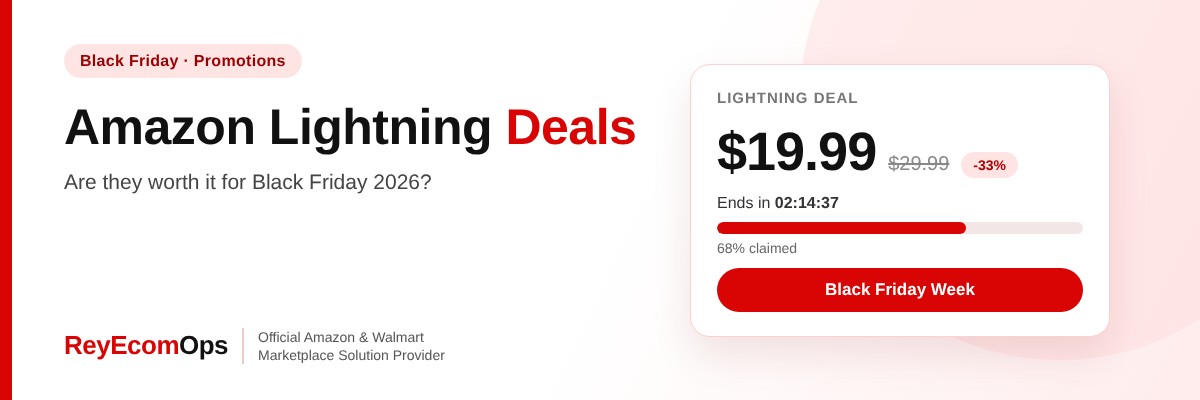
Shoppers search for Amazon Lightning Deals thousands of times a month, and those searches jump in Black Friday week. For sellers, a Lightning Deal can bring a burst of sales, new reviews and better ranking. It can also sell your stock at a loss if you don’t run the numbers first.
This guide explains how Lightning Deals work from the seller’s side, who is eligible, how to set one up, and how to decide whether a deal is really worth it this Black Friday.
Quick answer: An Amazon Lightning Deal is a short, limited-quantity promotion on the Today’s Deals page, usually running for a few hours. Sellers choose eligible products in Seller Central and pay a deal fee. They work best for products with strong ratings, enough stock and a margin that still holds after the discount and fee.
In this guide
- What Is an Amazon Lightning Deal?
- Lightning Deals vs Other Amazon Promotions
- Who Is Eligible?
- How to Create a Lightning Deal in Seller Central
- Deal Fees: Check Before You Commit
- Do the Margin Math First
- Are Lightning Deals Worth It for Black Friday Week?
- How to Get More From a Lightning Deal
- After the Deal: What to Measure
- Example: A Deal That Paid Off and One That Didn’t
- Alternatives If You Missed the Deal Deadline
- FAQs
1. What Is an Amazon Lightning Deal?
A Lightning Deal is a time-limited discount on a set number of units. It appears on Today’s Deals with a progress bar showing how much has been claimed. When time runs out or the units sell out, the deal ends. Prime members often get early access during big events.
2. Lightning Deals vs Other Amazon Promotions
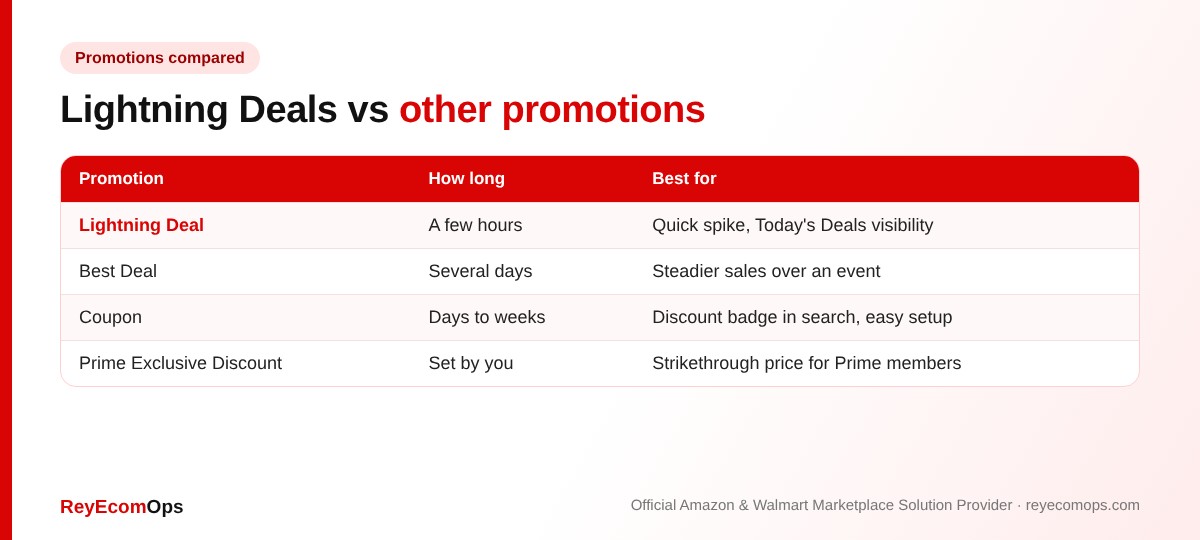
Amazon Lightning Deals give the biggest short burst of visibility, but coupons and Prime Exclusive Discounts are easier to set up and can still be added close to an event.
3. Who Is Eligible?
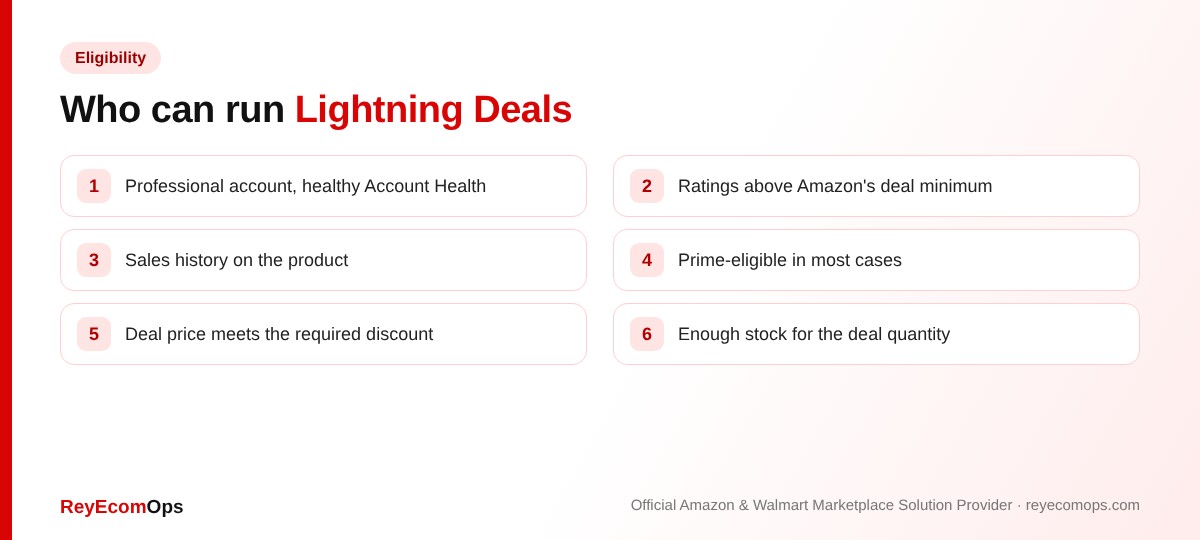
Amazon recommends eligible products in the Deals section of Seller Central. If a product doesn’t appear, the usual reasons are low ratings, too little sales history, a recent price increase or stock problems. Keep your Account Health in good standing, because a weak record can block deals.
4. How to Create a Lightning Deal in Seller Central
- Go to Advertising → Deals and create a new deal.
- Pick a product from the recommended list.
- Choose the deal type and the week or event you want.
- Set the deal price and quantity within Amazon’s limits.
- Review the fee and submit. Amazon must approve the deal.
Warning: Amazon closes submissions for big events weeks in advance. Black Friday Week and Cyber Monday deal submissions for 2026 closed on October 20, so late sellers should use coupons and Prime Exclusive Discounts instead, which can still be set up.
5. Deal Fees: Check Before You Commit
Amazon charges a fee for each deal, and the structure has changed in recent years. Check the current fee shown in Seller Central before submitting and include it in your margin math. In peak season, Amazon’s holiday peak fulfillment fees also apply from October 15, 2026 to January 14, 2027.
6. Do the Margin Math First
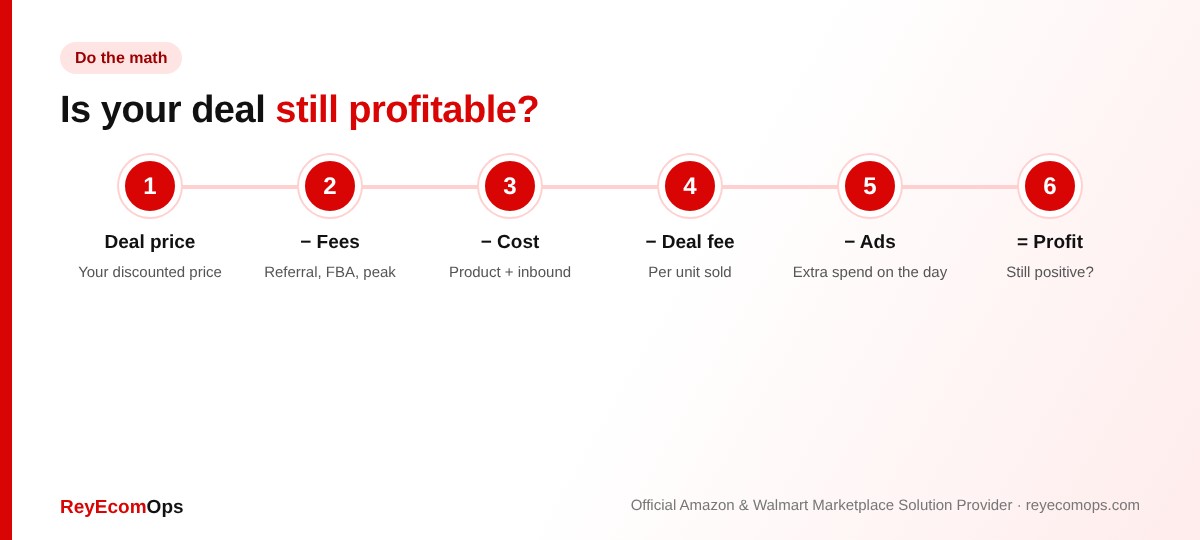
A deal only helps if each sale still earns money, or if the loss is a planned marketing cost. Work it out per unit before you submit. The free Amazon margin calculator gives you profit per unit in seconds.
| Line | Normal week | Lightning Deal |
|---|---|---|
| Selling price | $29.99 | $22.49 (25% off) |
| Referral fee (15%) | $4.50 | $3.37 |
| FBA fee (example, with peak) | $5.10 | $5.10 |
| Product + inbound cost | $9.00 | $9.00 |
| Deal fee per unit (example) | — | $0.60 |
| Profit per unit | $11.39 | $4.42 |
The fee figures above are examples. The point is that a 25% discount can cut profit per unit by more than half, so the deal needs extra volume or a clear ranking goal to be worth it.
Not sure a deal will pay off?
We’ll run the numbers on your top products before you commit.
7. Are Lightning Deals Worth It for Black Friday Week?
Usually worth it if
- The product has strong reviews and converts well.
- Margin is still healthy after the discount, fees and ads.
- You have enough stock for the deal and for December.
- You want reviews and ranking that last after the event.
Usually not worth it if
- Margin is thin, so the deal sells at a loss.
- Stock is low, so the deal could cause a stockout.
- Ratings are weak, so traffic won’t convert.
- The product is already your best seller at full price.
Running out of stock mid-deal is a common mistake. Our guide to winning the Amazon Buy Box explains why stockouts cost more than the lost sales.
8. How to Get More From a Lightning Deal
- Fix the listing first. Better images and copy convert deal traffic. See our Amazon product listing services.
- Support the deal with ads. Sponsored Products on deal days help. Our Amazon ads service sets budgets by ASIN.
- Keep stock in reserve. Leave enough for Cyber Monday and December.
- Check returns later. Deal buyers return items until January 31 under the holiday return policy.
9. After the Deal: What to Measure
| Measure | Why it matters |
|---|---|
| Units sold vs deal quantity | Shows real demand at that price |
| Profit per unit after all fees | Tells you if you’d run it again |
| Organic rank 7 and 14 days later | Shows if the boost lasted |
| New reviews | A longer-term benefit of the sales burst |
| Return rate | Deal buyers can return more often |
10. Example: A Deal That Paid Off and One That Didn't
| Product A: phone stand | Product B: candle set | |
|---|---|---|
| Rating | 4.6 stars, 2,100 reviews | 4.1 stars, 85 reviews |
| Margin after deal and fees | About 22% | Below 5% |
| Stock after the deal | Covered December | Sold out before Cyber Monday |
| Rank 14 days later | Higher than before | Lower than before, after stockout |
| Verdict | Run it again | Use a coupon next time |
Both products sold out their Amazon Lightning Deals quantity. Only one made the business better afterwards. The difference was rating, margin and stock, the same three things this guide asks you to check before submitting.
11. Alternatives If You Missed the Deal Deadline
- Coupons: a clip-able badge in search results, set up in minutes and running for the dates you choose.
- Prime Exclusive Discounts: a strikethrough price for Prime members, useful through Cyber Monday.
- Sponsored Products on deal days: extra visibility on your best-converting keywords.
- Bundles: a gift set can win sales without cutting the price of your main item.
Key takeaways
- Amazon Lightning Deals are short, limited-quantity promotions on Today’s Deals.
- Eligibility depends on ratings, sales history, discount and stock.
- 2026 Black Friday deal submissions closed October 20. Coupons are still an option.
- Include the deal fee and peak fees in your margin math.
- Only run a deal you can stock through December.