Walmart Seller Center: How to Sign Up, Log In and Fix Common Account Problems (2026)
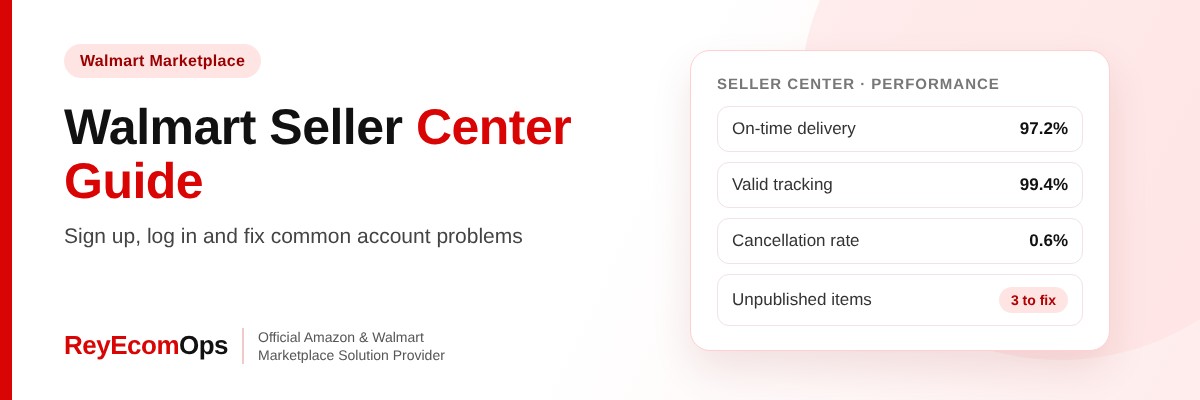
This guide covers how to get access, how to fix the most common account problems and what Walmart expects from sellers in 2026. ReyEcomOps is an Official Walmart Marketplace Solution Provider, and these are the issues we fix most often.
Quick answer: Walmart Seller Center is the dashboard where Marketplace sellers list items, manage orders, track performance and get paid. New sellers apply first and get access after approval. Most account problems come from login or verification issues, unpublished items and missed performance standards, and each can be fixed inside Seller Center.
In this guide
- What Walmart Seller Center Does
- How to Sign Up for Walmart Seller Center
- Common Walmart Seller Center Login Problems and Fixes
- Unpublished Items and How to Republish Them
- Walmart’s 2026 Performance Standards
- Seller-Fulfilled vs WFS
- Account Suspended or Under Review?
- Walmart Seller Center Checklist for the Holidays
- Where to Find Key Reports in Walmart Seller Center
- Improve Listing Quality to Grow Sales
- FAQs
1. What Walmart Seller Center Does
| Area | What you manage |
|---|---|
| Items | Add, edit and publish listings, check content quality |
| Orders | Acknowledge, ship, add tracking, handle cancellations and returns |
| Performance | On-time delivery, valid tracking, cancellations, defects, returns |
| Payments | Settlement reports and payout schedule |
| Fulfillment | Walmart Fulfillment Services (WFS) inbound shipments and stock |
| Advertising | Walmart Connect Sponsored Products campaigns |
2. How to Sign Up for Walmart Seller Center
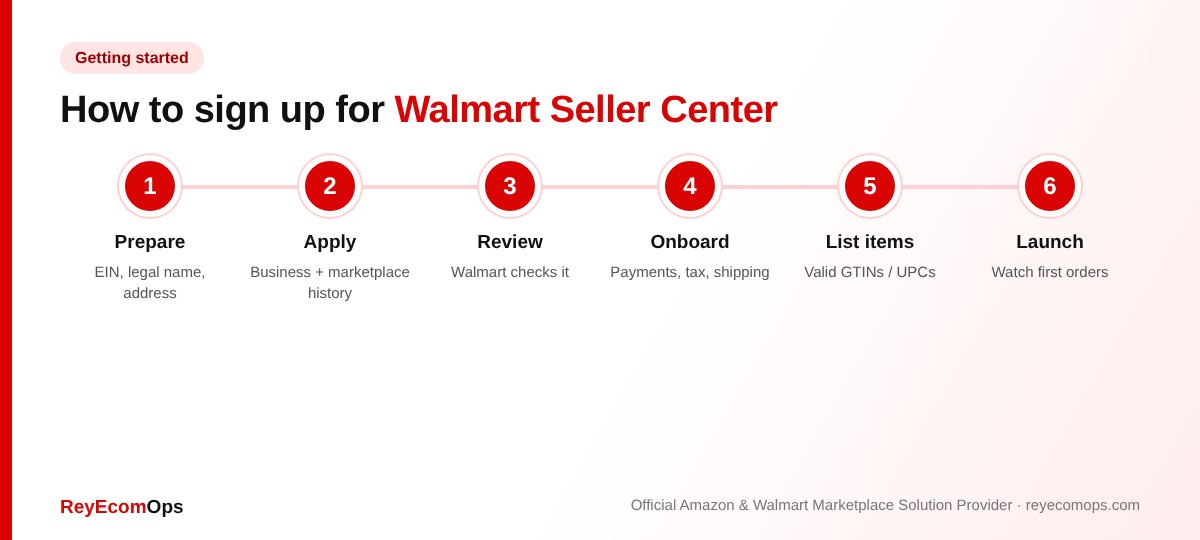
Selling on Walmart Marketplace starts with an application, and you get Seller Center access only after Walmart approves it.
- Apply with your business legal name, US business tax ID (EIN), business address and details of your ecommerce or marketplace history.
- Prepare product information, including valid GTINs or UPCs for your catalog.
- Wait for review. Incomplete details are the most common cause of delays.
- Complete onboarding once approved: payment details, tax forms, shipping settings and return policy.
- Add items one by one, in bulk with a spreadsheet, or through an integration.
- Launch and watch your first orders closely.
Pro tip: use exactly the same business name and address across your application, tax forms and bank details. Mismatches are the most common reason verification stalls.
3. Common Walmart Seller Center Login Problems and Fixes
A. Wrong account type
Your Walmart shopper login is not your Seller Center login. Use the email you registered as a seller.
B. Verification codes not arriving
Check that the phone number on file is current and wait a few minutes before requesting another code.
C. Locked after too many attempts
Reset the password from the Seller Center login page and wait before trying again.
D. Team members can't log in
Each person needs their own user added under account settings with the right permissions. Sharing one login is a security risk.
E. Browser problems
Clear your cache or try another browser before contacting Partner Support.
4. Unpublished Items and How to Republish Them
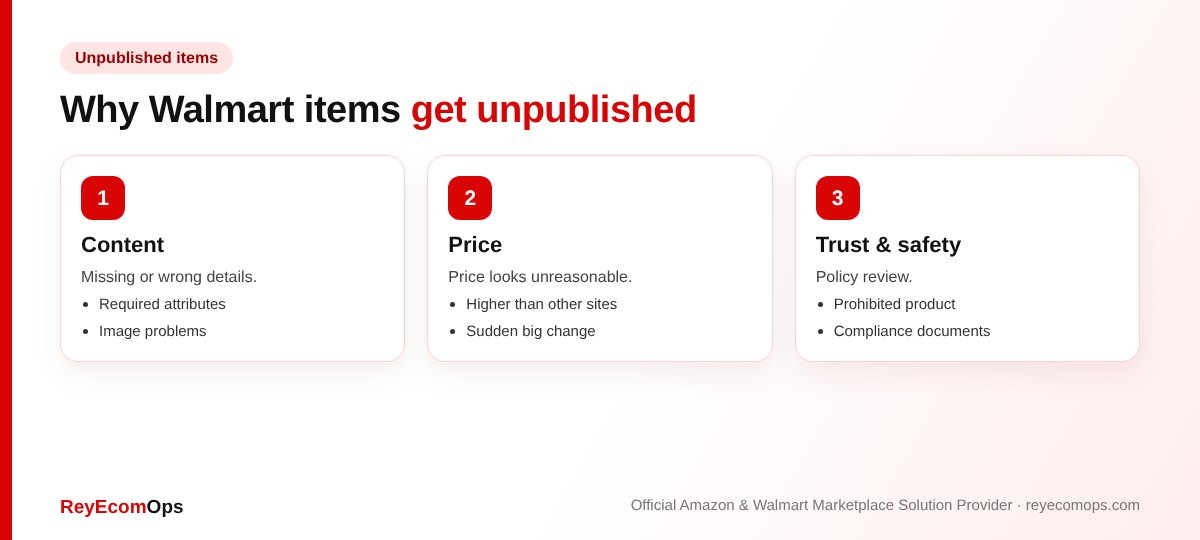
- Open the item list in Walmart Seller Center and filter by unpublished status.
- Read the unpublished reason shown for each item.
- Fix the content, image or price issue.
- Republish and check the status the next day.
Price-related unpublishing is common. Walmart compares your price with other channels, so a much higher Walmart price can remove the item from sale. Check margins with the free Walmart margin calculator before adjusting.
Items unpublished before Black Friday?
We’ll find the reason and republish them fast.
5. Walmart's 2026 Performance Standards
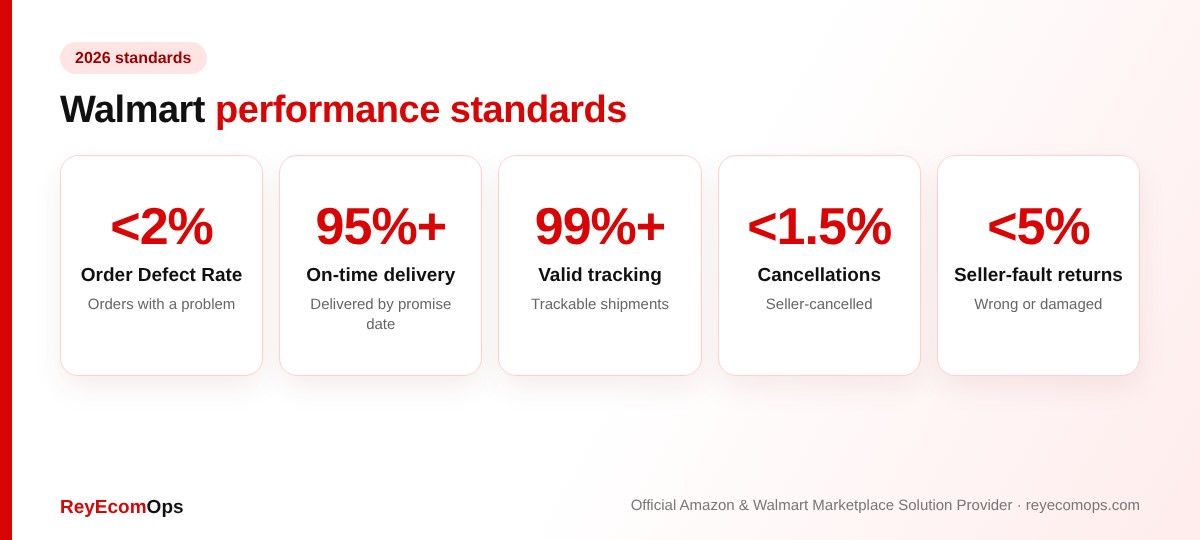
Walmart measures these over rolling periods. Missing them can lead to warnings, lower visibility, items unpublished or, in serious cases, account suspension. Check the Performance dashboard in Walmart Seller Center every week, and daily in peak season.
6. Seller-Fulfilled vs WFS
| Seller-fulfilled | Walmart Fulfillment Services | |
|---|---|---|
| Who ships | You or your 3PL | Walmart |
| On-time and tracking metrics | Your responsibility | Handled by Walmart |
| Fast delivery tags | Depends on your settings | Available on eligible items |
| Holiday risk | Late shipments, staff shortages | Inbound cut-offs, stock running out |
7. Account Suspended or Under Review?
If Walmart suspends or reviews your account, read the notice for the exact reason, fix the cause and reply with a clear action plan: what went wrong, what you changed and how you’ll prevent it. The structure is the same as an Amazon appeal, and our Plan of Action template is a useful starting point.
8. Walmart Seller Center Checklist for the Holidays
- Every user has their own login and correct permissions.
- No unpublished items among your best sellers.
- Prices aligned with Amazon and your own website.
- Processing times set for Thanksgiving week closures.
- WFS stock checked daily, with inbound shipments planned around cut-offs.
- Performance dashboard green on every metric.
- Walmart Connect campaigns funded for peak days.
If you want help running all of this day to day, our Walmart account management team handles listings, performance and Walmart Connect for Marketplace sellers.
9. Where to Find Key Reports in Walmart Seller Center
Most problems are easier to fix when you know where the data lives. These are the reports and pages sellers use most:
| What you need | Where to look | How often |
|---|---|---|
| Unpublished items and reasons | Items → item list, filter by status | Daily in Q4 |
| Order Defect Rate, on-time delivery, tracking | Performance dashboard | Weekly, daily in Q4 |
| Payouts and fees | Payments → settlement reports | Each payout |
| WFS stock and inbound shipments | WFS inventory and shipments pages | Daily in peak season |
| Ad results | Walmart Connect campaign reports | Daily on peak days |
| Listing quality | Listing Quality dashboard | Monthly |
10. Improve Listing Quality to Grow Sales
Walmart Seller Center includes a Listing Quality score that rates content, ratings and reviews, price competitiveness and shipping speed. Items with higher scores usually get more visibility. The quickest wins are:
- Fill in every required and recommended attribute.
- Use at least four clear images, including one on a white background.
- Write a specific title with brand, product type and key features.
- Keep price competitive with other major channels.
- Offer two-day or faster shipping where you can, or use WFS.
Before: “Stainless Bottle 32oz”
After: “BrandName Insulated Stainless Steel Water Bottle, 32 oz, Leak-Proof Lid, Keeps Drinks Cold 24 Hours, Matte Black”
If you sell on both marketplaces, see our guide to winning the Amazon Buy Box. Walmart’s featured offer works in a similar way, so the same price, speed and performance habits help on both.
Key takeaways
- Walmart Seller Center access comes after your application is approved.
- Most login issues come from using the wrong account or out-of-date verification details.
- Unpublished items show a reason in the item list. Fix it and republish.
- 2026 standards: ODR under 2%, on-time over 95%, valid tracking over 99%.
- Check performance weekly, and daily in Q4.